
How Liquid Clustering Actually Works in Databricks
Why automatic data organization replaces weekly OPTIMIZE jobs, eliminates partition explosions, and lets you change clustering keys without rewriting data.

Most engineers enable Liquid Clustering without understanding what actually happens under the hood - then wonder why query performance doesn’t improve.
In this post, you’ll learn:
How clustering-on-write works: The size thresholds that determine when data gets organized automatically vs deferred to OPTIMIZE
File statistics vs partition pruning: The architectural difference that makes clustering work without folder explosion
Changing keys in production: What actually happens during ALTER TABLE and how queries work during transition
When NOT to use clustering: The specific scenarios where partitioning still wins
Migration playbook: Zero-downtime strategy for partitioned tables with active streaming writes
Let’s start with the core mechanics that 90% of engineers get wrong.
We’ll explore the technical reality through a candid dialogue between a curious Data Engineer and the Databricks documentation.
The Core Concept
Data Engineer:
“I run OPTIMIZE and Z-ORDER weekly to keep query performance decent.
But Liquid Clustering just... maintains itself? How does that even work?”
Databricks:
“It’s not magic. It’s automatic data reorganization.”
Data Engineer:
“Okay, what happens when I write data?”
Databricks:
“When you CREATE TABLE ... CLUSTER BY (user_id, date), significant writes automatically organize data by those keys.
New files land co-located with matching keys, so your reads skip irrelevant files naturally.
For smaller writes, OPTIMIZE handles the organization later.”
Data Engineer:
“What about compaction? Don’t I need OPTIMIZE anymore?”
Databricks:
“OPTIMIZE still compacts small files into larger ones.
But with Liquid Clustering, you skip Z-ORDER entirely because clustering keys already organize data layout.
Run OPTIMIZE without Z-ORDER, and it respects your clustering.”
Data Engineer:
“How does this avoid partition explosions?”
Databricks:
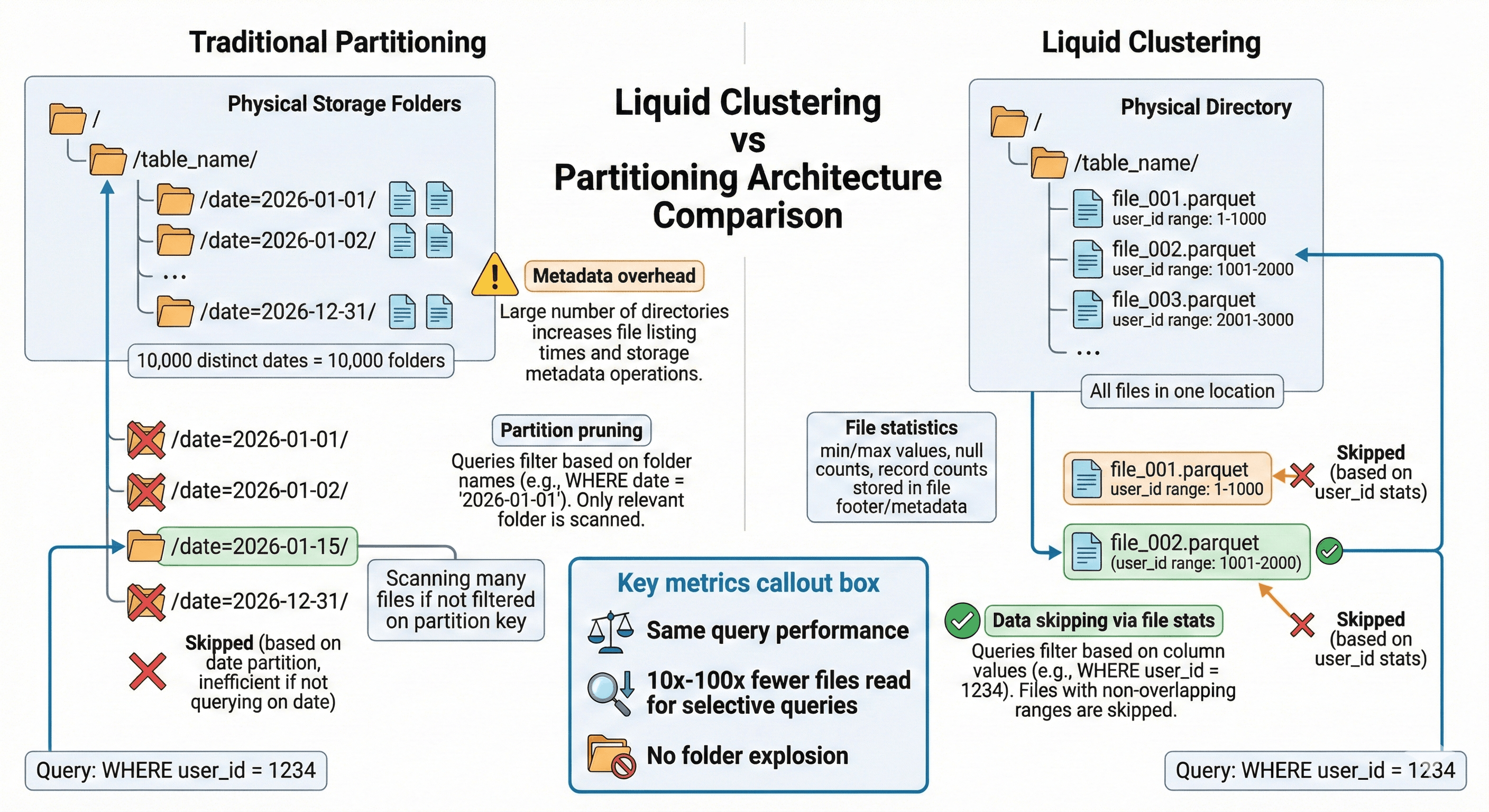
“Partitioning creates physical folders for each partition value. With 10,000 distinct dates, you get 10,000 folders and metadata overhead.
Liquid Clustering organizes data by keys without creating separate folders, using Delta Lake file statistics for data skipping.
Same query performance, no folder explosion.”
Data Engineer:
“Can I change clustering keys later?”
Databricks:
“Yes. ALTER TABLE ... CLUSTER BY (new_keys).
New writes use the new keys immediately. Old files get reorganized during the next OPTIMIZE.
No data rewrite required upfront.”
Data Engineer:
“So Liquid Clustering automatically organizes data by my keys during writes, skips the Z-ORDER step, and lets me change keys without rewriting everything?”
Databricks:
“Exactly.
That’s the whole system - automatic layout, flexible keys, no partition explosions.”
How Clustering on Write Actually Works
Now that you understand the basics, let’s dig into what happens during writes.
Data Engineer:
“You said clustering happens automatically on writes. But does EVERY write trigger clustering?”
Databricks:
“No. Clustering on write only triggers when data meets a size threshold.
For Unity Catalog managed tables, the threshold is 64 MB for 1 clustering column, 256 MB for 2 columns, 512 MB for 3 columns, and 1 GB for 4 columns.
Below these thresholds, Databricks skips clustering to avoid overhead on small writes.”
Data Engineer:
“So if I’m doing frequent small appends, clustering doesn’t happen until OPTIMIZE?”
Databricks:
“Correct. Small appends create files that aren’t clustered yet.
OPTIMIZE incrementally reorganizes those files based on your clustering keys.
Think of it as: writes create roughly organized files, OPTIMIZE perfects the organization.”
Data Engineer:
“What if my table has streaming ingestion running continuously?”
Databricks:
“Schedule OPTIMIZE to run every 1-2 hours for frequently updated tables.
Or better: enable predictive optimization for Unity Catalog managed tables. It automatically runs OPTIMIZE when beneficial.
Enable it, and the system handles clustering maintenance for you.”
File Statistics vs Folder Pruning
Here’s the architectural difference that makes clustering work without partitions.
Data Engineer:
“You mentioned file statistics for data skipping. How is that different from partition pruning?”
Databricks:
“Partition pruning skips entire folders based on folder names. If you query WHERE date = ‘2026-01-15’, Spark reads only the /date=2026-01-15/ folder.
Liquid Clustering uses Delta Lake file statistics - min/max values, null counts, record counts stored in the transaction log.
When you query WHERE user_id = 123, Spark checks file statistics and skips files that don’t contain user_id 123.”
Data Engineer:
“Which columns get statistics collected?”
Databricks:
“By default, the first 32 columns in your table schema.
For Unity Catalog managed tables with predictive optimization, statistics are chosen intelligently without the 32-column limit.
Your clustering keys must be in columns with statistics collected.”
Data Engineer:
“Does this mean clustering works best with low-cardinality columns?”
Databricks:
“Not necessarily. Clustering works with any cardinality because it relies on file statistics, not folder structures.
A column with 10,000 distinct values works fine - you won’t create 10,000 folders like with partitioning.
The key is choosing columns frequently used in WHERE clauses and JOINs.”
Changing Clustering Keys in Production
This is where Liquid Clustering’s flexibility becomes critical.
