
Partition Pruning vs Data Skipping: A Databricks Interview Deep Dive
How Spark's optimization layers work at directory, file, and row levels - and why understanding the difference wins offers

Interview for a senior Databricks Data Engineer role: “Partition pruning vs data skipping?” 85% say “both skip data” and get rejected.
This question separates engineers who use partitionBy from those who understand Spark’s optimization layers. Yes, both skip data - but they work at completely different levels. Here’s the offer-winning answer.
Table of Contents
⚠️ The Junior (Rejection) Answer
✅ The Senior (Offer-Winning) Answer
⚙️ Partition Pruning: Folder-Level Elimination
🔍 Data Skipping: File-Level Elimination
(Paywall)
💡 Z-Ordering: Making Data Skipping Actually Work
🧠 What Actually Happens Under the Hood
🎯 What Interviewers Ask Next
🚫 Red Flags That Cost Offers
🔀 Decision Tree for Interview Follow-Ups
📋 STAR Story Template
📝 TL;DR
⚠️ The Junior (Rejection) Answer
“They both skip data you don’t need. Partition pruning uses folder structure, data skipping uses file statistics.”
This is technically correct but shows surface-level understanding. Interviewers hear this answer 10 times a day. It tells them you’ve read the docs but haven’t internalized how these optimizations actually work in the query execution pipeline.
Why it fails: You’re describing WHAT they do, not HOW they work or WHERE in the optimization pipeline they operate. Senior engineers think in layers.
✅ The Senior (Offer-Winning) Answer
“Partition pruning happens at the file system level - Spark never lists files in irrelevant partition directories. Data skipping happens at the file level - Delta reads min/max stats from the transaction log to skip entire Parquet files. You can combine both: partition by date, Z-order by customer_id.”
This answer demonstrates:
Understanding of the optimization pipeline (directory → file → row)
Knowledge of Delta Lake’s architecture (transaction log)
Practical wisdom on combining strategies
Awareness of when to apply each technique
⚙️ Partition Pruning: Folder-Level Elimination
Junior thinking: “Partitions organize data into folders”
Senior understanding: When you query WHERE date = ‘2024-01-15’, Spark’s query planner checks the partition column metadata. It never issues a LIST command to irrelevant folders. This happens during query planning, before any file operations.
A 3TB table partitioned by date with 365 days? Spark only lists files in 1 folder, skipping 99.7% at the directory level. The key insight: this optimization happens at the Spark Catalyst level, during logical plan optimization. Spark rewrites the query plan to only include relevant partition paths.
When partition pruning applies:
Filter predicates on partition columns (=, IN, <, >, BETWEEN)
Predicates must be deterministic (no UDFs, no random())
Works with static partition values (not dynamic subqueries in some cases)
When to use partitioning: Low-cardinality columns you always filter on (date, region, status). The sweet spot is 10-1000 unique values. Too few partitions: no benefit. Too many: small file problem.
🔍 Data Skipping: File-Level Elimination
Junior thinking: “Delta stores min/max values”
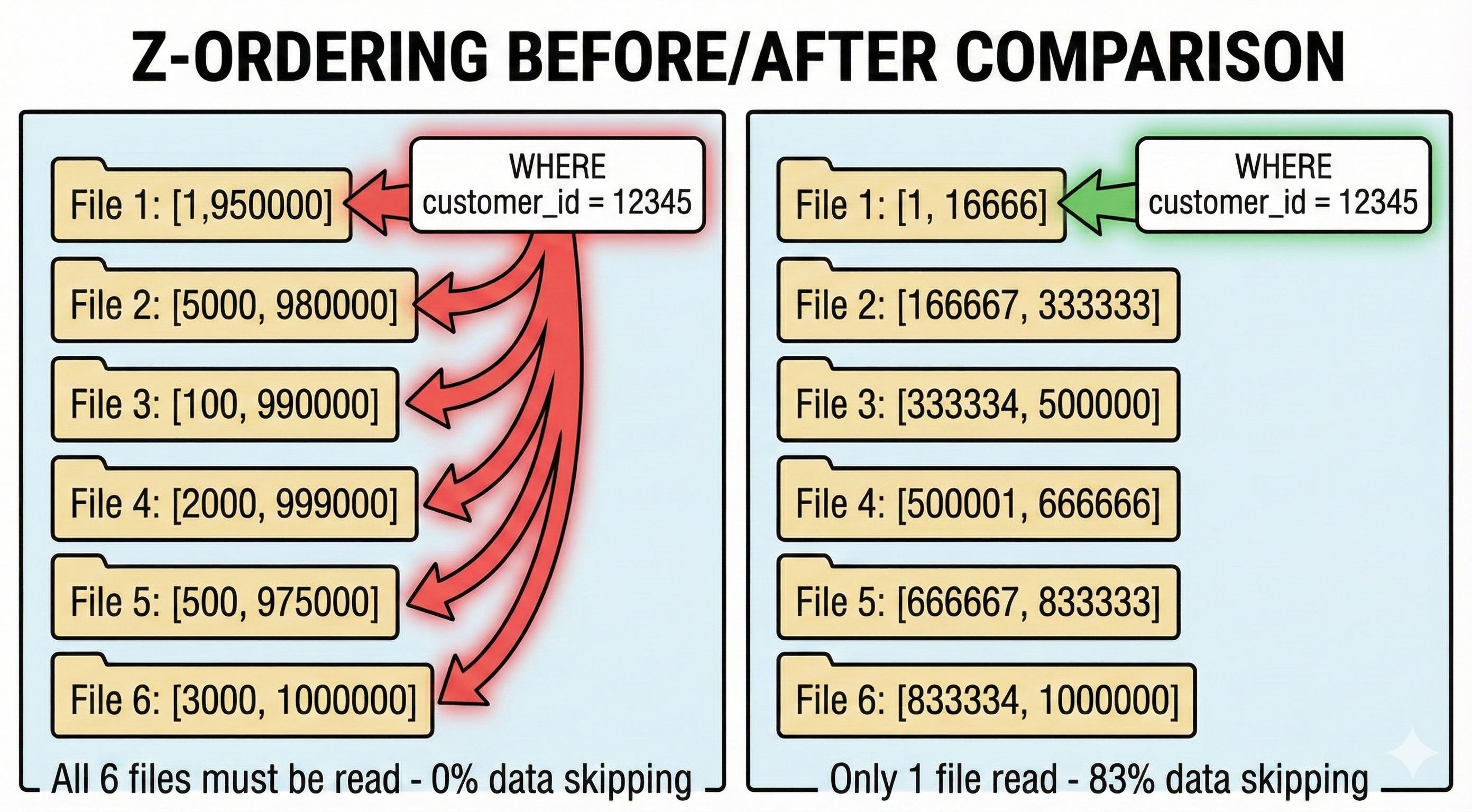
Senior understanding: Delta’s transaction log stores min/max stats for the first 32 columns by default. When you query WHERE customer_id = 12345, Spark reads these stats from the log (not the files). If customer_id 12345 is outside a file’s [min, max] range, that file is skipped entirely.
The critical difference: Partition pruning eliminates directories before listing. Data skipping eliminates files after listing but before reading. Both reduce I/O, but at different pipeline stages.
Key insight on column statistics: Delta collects stats for columns based on schema order. If your frequently filtered column is position 50, it won’t have stats by default. You can configure this with delta.dataSkippingNumIndexedCols, but the better approach is to design your schema with filtered columns first.
What stats are actually stored:
MIN value (for the column in that file)
MAX value
NULL count
Total row count
For string columns, min/max are based on lexicographic ordering. For struct fields, each field counts individually toward the 32-column limit (so a struct with 10 fields uses 10 of your 32 slots). Maps and arrays cannot have statistics collected.
Note on managed tables: Unity Catalog managed tables with predictive optimization choose statistics intelligently and don’t have the 32-column limit.
💡 Z-Ordering: Making Data Skipping Actually Work
Junior thinking: “Z-ordering is like sorting”
Senior understanding: Without Z-ordering, your data arrives in write order. Customer IDs 1-1,000,000 could be scattered across every file. When you query customer_id = 12345, every file’s min/max range might include it. Data skipping becomes useless.
Z-ordering clusters related values together using a space-filling curve. (Technical note: Databricks ZORDER actually uses Hilbert curves internally, which provide better data locality than traditional Z-order curves, especially for multi-column clustering. The command is still called ZORDER BY.) After Z-ordering by customer_id:
File 1: customer_id range [1, 10000]
File 2: customer_id range [10001, 20000]
And so on...
Now customer_id = 12345 only matches 1-2 files instead of hundreds. Your data skipping effectiveness goes from 0% to 95%+.
Z-order vs OPTIMIZE:
OPTIMIZE alone just compacts small files
OPTIMIZE ZORDER BY actually reorganizes data layout
Z-ordering is expensive - only run it when you’re done with major writes
Multi-column Z-ordering trade-offs:
ZORDER BY (col_a, col_b) balances locality for both columns
More columns = worse locality for each individual column
Stick to 1-3 columns max, prioritize your most selective filters
Hard limit: Hilbert indexing supports a maximum of 9 columns (you’ll get an error if you exceed this)
What You’ll Get in the Full Deep-Dive
After reading this, you’ll understand Spark’s execution pipeline well enough to answer any follow-up question interviewers throw at you.
In the next 5 minutes, you’ll learn:
→ The 6-Phase Execution Pipeline: Exactly where partition pruning and data skipping happen in Catalyst
→ Follow-Up Questions: 6 common interviewer questions with senior-level answers
→ Red Flags That Cost Offers: 4 answers that signal junior thinking
→ Decision Tree: How to pivot based on where the interviewer probes
→ STAR Story Template: Turn this into a compelling interview story with your own numbers
Miss this in an interview, and you’re another “both skip data” rejection.
The rest of this post is for premium subscribers. Subscribe to get the complete walkthrough.
