
Auto Loader vs Structured Streaming Is a False Choice
The real decision is your source, not the engine

Every Databricks team eventually has the same argument. Auto Loader or Structured Streaming for ingestion?
It is the wrong argument.
Auto Loader is Structured Streaming. It is a source that plugs into the exact same engine. The engineers who get trusted to design the bronze layer stopped picking between the two and started picking by source instead. That one shift is what this piece is about.
Auto Loader is a Structured Streaming source, not a rival
Here is the part that ends the debate. Auto Loader is not a separate engine. It is a streaming source, the cloudFiles source, that feeds the same Structured Streaming runtime everything else uses.
The write side is identical either way. Same stream writer. Same checkpoint. Same trigger options. Same exactly-once sink guarantees. The only thing Auto Loader changes is how data gets read in.
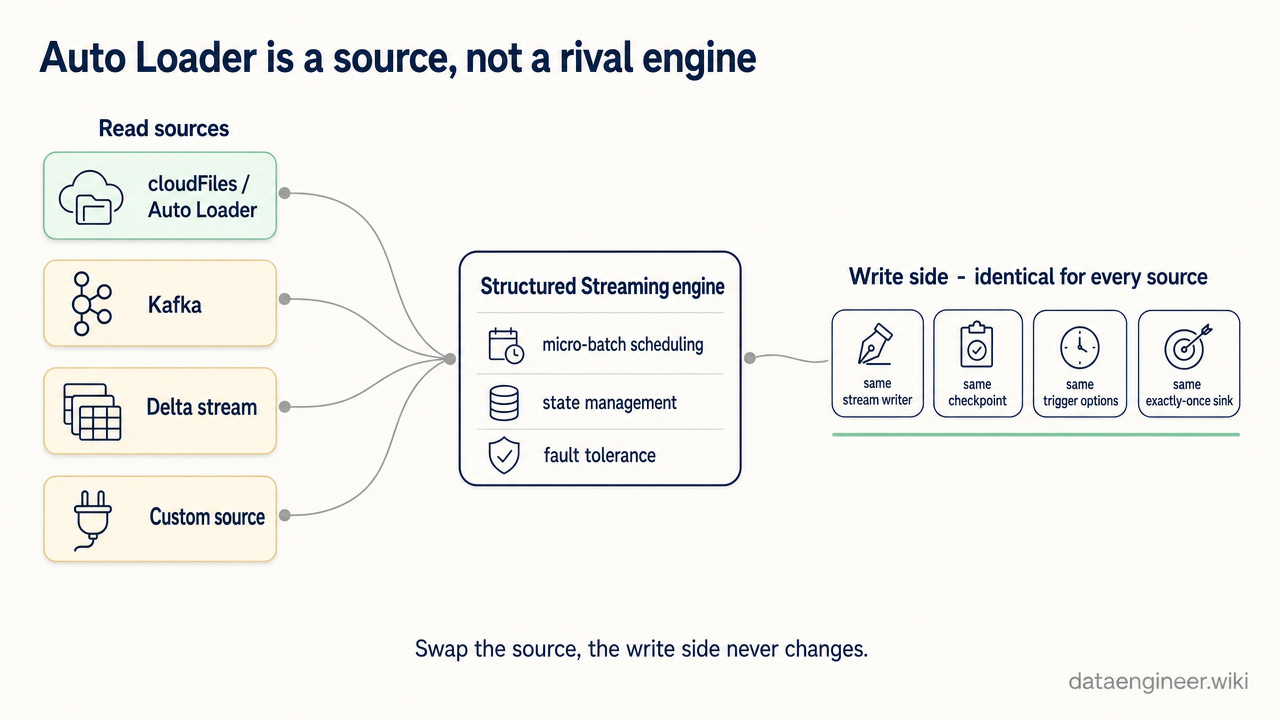
So the question was never Auto Loader versus Structured Streaming. The question is: what is your source, and how much of the read side do you want to manage yourself?
The four dimensions that actually differ
For file ingestion from cloud object storage, Auto Loader (the cloudFiles source) and the plain file source diverge on four things that matter in production.
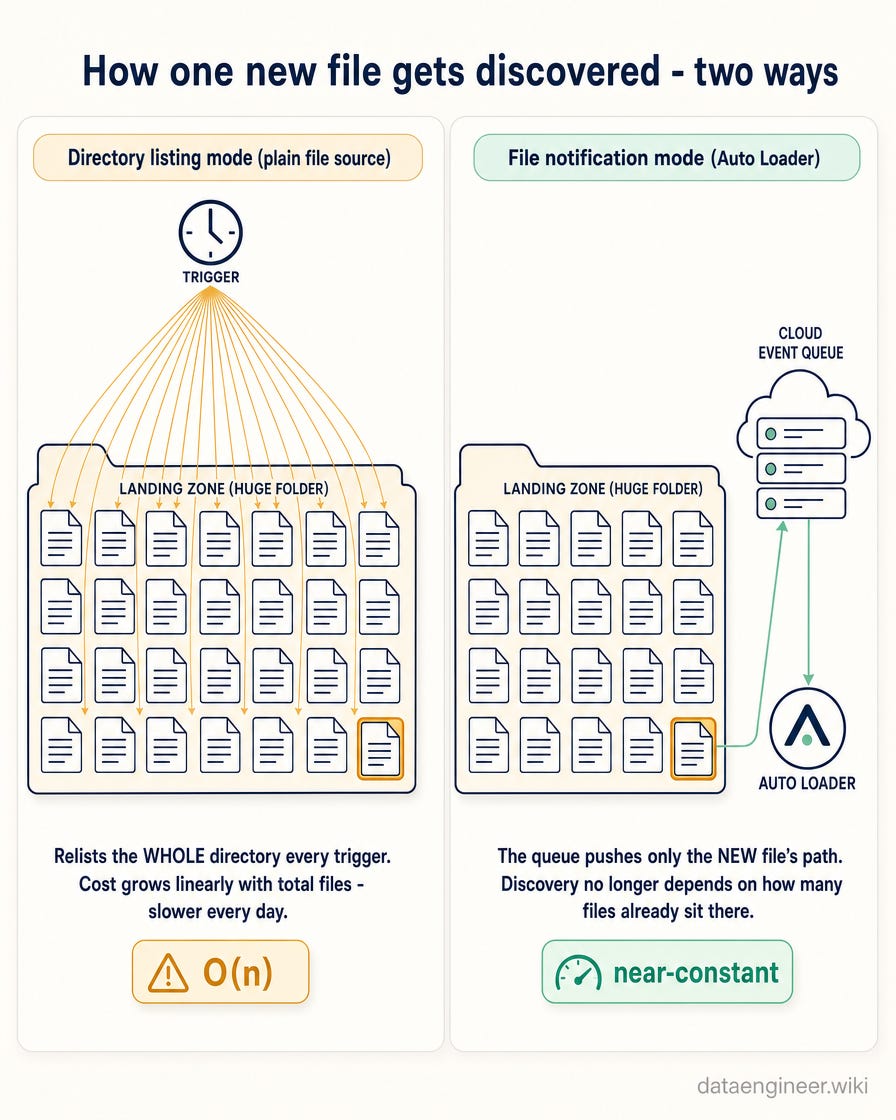
Discovery. The plain file source relists the directory on every trigger to find new files. That cost grows linearly with the number of files already in the path, so a landing zone that accumulates millions of files gets slower every single day. Auto Loader can run in file notification mode, where a cloud notification queue pushes new file paths to it. Discovery stops depending on how many files already sit in the directory.
State and exactly-once. Both track which files they have already processed in the checkpoint. But the plain source keeps that state in a form that strains at very high file counts. Auto Loader records processed files in a scalable key-value store inside its checkpoint, so it deduplicates cleanly into the billions of files without reprocessing.
Schema evolution. The plain file source takes a schema you hand it. A new column shows up in the data and it gets dropped silently, or the stream breaks. Auto Loader infers and tracks the schema, and its schema evolution mode decides what happens when a new column appears: add it, rescue it into a dedicated rescued-data column, fail loudly, or ignore it. You choose the failure mode instead of discovering it in production.
Operational cost. Directory listing is the hidden line item. On a busy landing zone, relisting a huge directory on every micro-batch burns compute for no new data. File notification turns that linear cost into a near-constant one, and running with Trigger.AvailableNow lets you process everything available and shut the cluster down instead of paying for an always-on stream.
When to reach for each
Now the decision. Pick by source, not by habit.
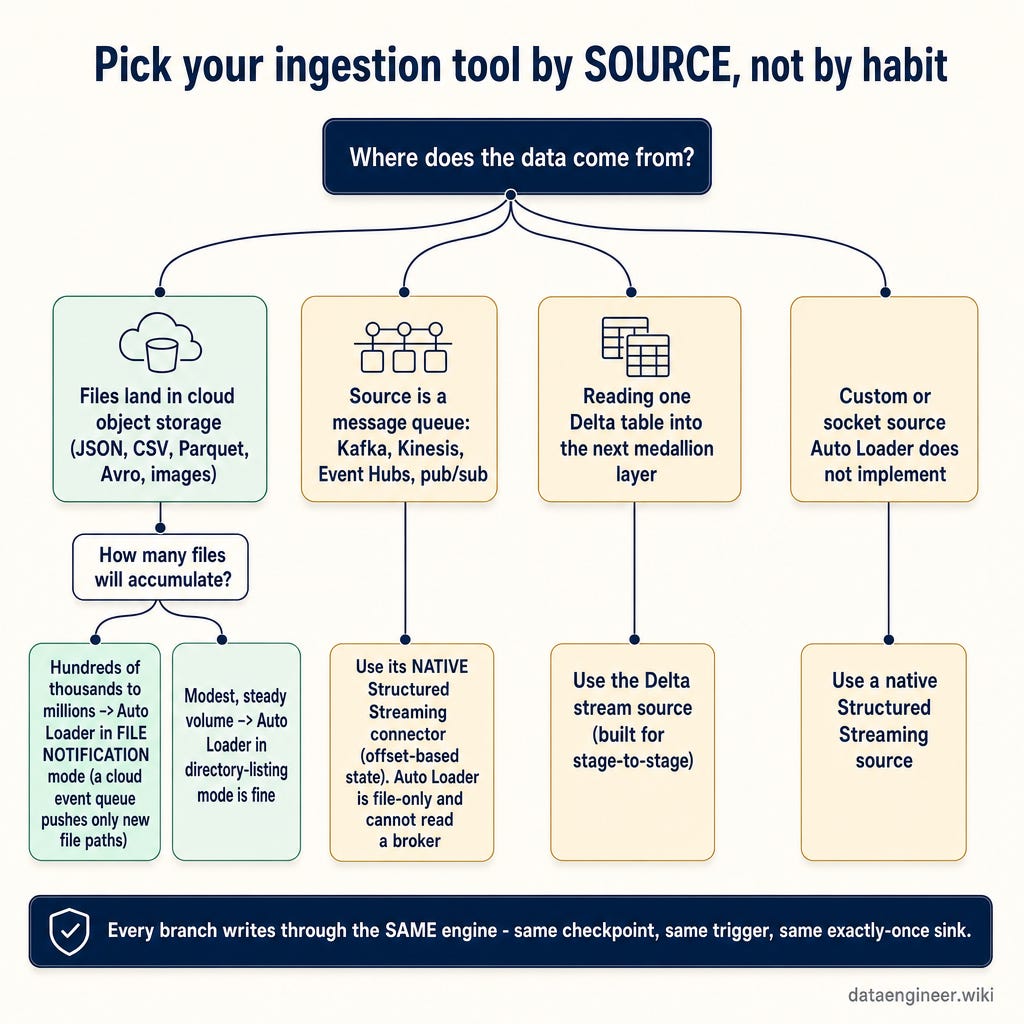
Use Auto Loader when: → Files land incrementally in cloud object storage (JSON, CSV, Parquet, Avro, images, text) → The landing zone will grow into the hundreds of thousands or millions of files → Upstream schemas drift and you need new columns to survive, not silently vanish → You want scheduled incremental batches over an always-on cluster
Do NOT use Auto Loader when: → Your source is a message queue: Kafka, Kinesis, Event Hubs, or pub/sub. Auto Loader is file-only and cannot read a broker. → You are chaining medallion stages off an existing Delta table (stream from the Delta table directly instead) → The data is a single small static file set a plain batch read handles fine
Use a native Structured Streaming source when: → The source is a message queue or event stream: use its dedicated connector, where state is offset-based, not file-based → You need a custom or socket source Auto Loader does not implement → You are reading one Delta table into the next layer (the Delta stream source is built for exactly this)
One tool everywhere is the tell. It means you picked the tool before you looked at the source.
The mistakes that get pipelines redesigned in review
Pointing the plain file source at a landing zone that grows without bound, then wondering why ingestion slows every week. That is directory-listing cost, not a cluster problem.
Reaching for Auto Loader to read Kafka. It is a file source. It will never read a broker.
Leaving Auto Loader in directory-listing mode on a high-file-count path when file notification would cut discovery cost to near-constant.
Never setting a schema evolution mode, then getting silently rescued data or a broken stream the first time upstream adds a column.
Treating Auto Loader and Structured Streaming as different engines and rebuilding the write side when you switch sources. The write side never changed.
Deleting or moving the checkpoint to reset a stream, which makes Auto Loader lose its file-tracking state and reprocess everything from zero.
Running an always-on cluster for data that lands a few times a day, when a triggered incremental run would process the backlog and stop.
Any one of these gets your pipeline sent back in design review. Picking the right source-and-tool combination is exactly the judgment that separates the engineer who is handed the bronze layer to design from the one who is handed a ticket to fix it. That gap is the difference between a mid-level title and a $200k senior offer.
The question that replaces the debate
Stop asking whether to use Auto Loader or Structured Streaming. They are the same engine.
Ask instead: where does my data come from, and how much of the read side do I want to own? Files in object storage that drift and grow, Auto Loader. A broker or a custom feed, a native source. A Delta table flowing to the next layer, a Delta stream.
Match the tool to the source, and the debate disappears.
What is the one ingestion source your team still forces into the wrong tool? Drop it in the comments and I will work through the right setup for the top few.
Premium Further Reading
If this piece changed how you pick an ingestion tool, these are the deep-dives a reader would naturally open next: how the tool actually works, what the sink underneath it guarantees, and where the same judgment shows up in a $200k interview. Old posts are auto-archived for premium subscribers only.
This article picks by source and leans on four dimensions: discovery, exactly-once state, schema evolution, and cost. The reads below go deeper on the Auto Loader mechanics, the Delta sink they write to, and the schema-evolution call that trips up production and interviews alike.
Databricks Auto Loader Deep Dive: A File’s 7-Step Journey from S3 to Delta: Master schema inference, file notifications, and checkpointing to troubleshoot ingestion failures and optimize your pipelines.
The Databricks Schema Management Guide: When to Evolve and When to Enforce: The strategic pattern that turns schema evolution from a 40-hour debugging disaster into controlled change management
Why Delta Lake Exists and What Plain Parquet Couldn’t Do: The four failures that killed the raw data lake
Real-Time Pricing Optimization with Databricks: An E-Commerce Case Study: How streaming data pipelines, Delta Lake, and MLflow turn customer purchases into data-driven pricing decisions in under 3 hours
How to Handle Schema Evolution Questions in $200k Databricks Data Engineer Interviews: The follow-up questions that separate mid-level from senior answers
Keep Practicing?
You just learned to pick an ingestion tool by source, not by habit. Now drill Auto Loader and streaming, build a real ingestion pipeline lab end-to-end, and turn that same judgment into a senior interview answer.
DataDojo (633 exercises): Duolingo-style daily practice for Databricks data engineers - seven zones, XP, streaks, and certification prep.
Databricks Code Practice (104 exercises + 5 labs): One repo, three tracks: 104 LeetCode-style exercises, 4 end-to-end pipeline labs, and benchmark deep-dives. Runs on Databricks Free Edition.
Databricks 100 (100 concepts): The must-know concepts for every Databricks data engineer. Self-score, find gaps, commit to the 100-day challenge.
Senior Interview Cheat Sheet: Structure your production experience into the senior-level answers that get $175K-$210K+ offers.