
How Senior Engineers Actually Choose DLT vs Workflows
The compose pattern most teams miss (6 min read)

Every Databricks team eventually has the DLT versus Workflows argument. Someone wants to rebuild the whole platform on Delta Live Tables because it is the modern, declarative way. Someone else wants to keep everything in Workflows because that is what they know and it never surprises them.
Both are answering the wrong question.
DLT and Workflows are not two options for the same job. One is a transformation framework. The other is an orchestrator. Treating them as competitors is the tell that separates an engineer who reaches for whatever they have heard is “best practice” from one who picks the tool that fits the pipeline in front of them.
Here is the distinction that makes every downstream decision obvious: DLT builds tables. Workflows runs tasks. Hold those two jobs apart and the “which one” question mostly answers itself.
Delta Live Tables builds the tables for you
DLT (now Lakeflow Spark Declarative Pipelines in Databricks’ branding) is a declarative framework for building Delta tables. You declare the tables you want and the transformations that produce them. DLT reads the references between your datasets, works out the dependency graph itself, and manages the compute, retries, checkpointing, and incremental processing underneath.
Its signature feature is built-in data quality. You attach expectations to a table, rules a row must satisfy, and choose what happens when a row fails: warn and track it, drop it, or fail the run. That quality layer is declared right next to the transformation, not bolted on as a separate validation job. DLT also handles change data capture through a declarative merge, so slowly changing dimensions stop being hand-written MERGE logic you babysit.
Reach for DLT when: → Your workload is mostly building and maintaining Delta tables through SQL or PySpark transformations → You want data-quality rules enforced and tracked as part of the pipeline, not scattered across a separate job → You have streaming ingestion or CDC and do not want to hand-maintain checkpoints and MERGE logic → Your DAG is defined by how tables depend on each other (bronze to silver to gold)
It fights you when: → You need to run arbitrary work, such as calling an external API, training a model, or moving files, that does not produce a declared table → Your orchestration has branching logic (”if last night’s load failed, do X”) that is not about table dependencies → You need full control over the exact cluster and libraries for a specific step → You are cost-sensitive on a simple job. DLT runs on managed compute and its quality and CDC capabilities sit in higher product tiers, so it carries a premium over a plain job running the same Spark
Workflows runs whatever you tell it to
Workflows (Lakeflow Jobs) is a general-purpose orchestrator. A job is a graph of tasks, and a task can be almost anything: a notebook, a Python script, a SQL query, a JAR, a dbt project, another job, or a DLT pipeline. You wire the dependencies yourself with explicit task ordering, and you get conditional branching, loops over parameters, retries, alerts, and scheduling.
What Workflows does not give you is any opinion about your data. No built-in expectations, no automatic CDC, no managed incremental state. If you want data-quality gates, you write them. That is the trade: total control, zero guardrails.
Reach for Workflows when: → You are orchestrating mixed work, such as notebooks, SQL, dbt, ML, and file operations, not just table transformations → You need branching, loops, or conditional execution based on runtime results → You want to control compute per task (serverless for one, a tuned job cluster for another) → You are stitching together steps that different teams or tools own
It fights you when: → Your whole pipeline is table-to-table transformations and you end up hand-building the dependency graph DLT would have inferred → You find yourself re-writing the same checkpoint, MERGE, and quality-check code DLT ships out of the box → You want quality violations tracked over time without building your own metrics table
The four dimensions that actually decide it
Strip away the hype and the choice comes down to four questions.
Authoring model. Declarative or imperative? DLT: you describe the end state and it works out the how. Workflows: you script the steps and the order. If your logic is “these tables depend on those tables,” declarative wins. If it is “do this, then that, unless the first thing failed,” imperative wins.
Data-quality enforcement. Do you need quality gates as first-class citizens? DLT makes expectations part of the table definition and tracks pass and fail rates for you. In Workflows, quality is code you own end to end. Teams under audit or tight SLA pressure lean DLT for the built-in lineage and quality tracking.
Cost. DLT trades money for managed convenience. The compute is handled for you and the richer features sit in higher tiers. A plain Workflow on a right-sized job cluster is usually the cheaper way to run simple, well-understood transformations. Pay the DLT premium when the guardrails and reduced maintenance are worth more than the compute difference.
Lock-in. This one shifted recently. Databricks open-sourced the declarative pipeline model as Spark Declarative Pipelines, now part of Apache Spark, so the core authoring - the table and flow definitions - can run on other Spark engines. What stays Databricks-specific is the managed layer around it: Unity Catalog integration, managed compute, Photon, the pipeline tooling, and the convenience APIs. The AUTO CDC API (the automatic SCD Type 1 and Type 2 handling, formerly APPLY CHANGES) is not in open-source Spark, so the declarative CDC that saves you from hand-written MERGE logic is one of the things that does not travel. So the real DLT lock-in is the managed platform, not the syntax. In Workflows, the orchestration wiring is Databricks-specific but the task logic is mostly portable Spark. If multi-engine portability is a hard requirement, weigh which layer you actually lean on.
The senior pattern: they compose
Here is what the argument misses entirely. The best answer is often both.
You can run a DLT pipeline as a single task inside a Workflow. So the mature pattern is not “DLT or Workflows.” It is Workflows as the outer orchestrator handling scheduling, arbitrary tasks, and branching, with one or more DLT pipelines doing the declarative table-building inside it. Ingestion and file prep as notebook tasks, the medallion transformations as a DLT pipeline, ML scoring and downstream exports as more tasks, all sequenced by the job.
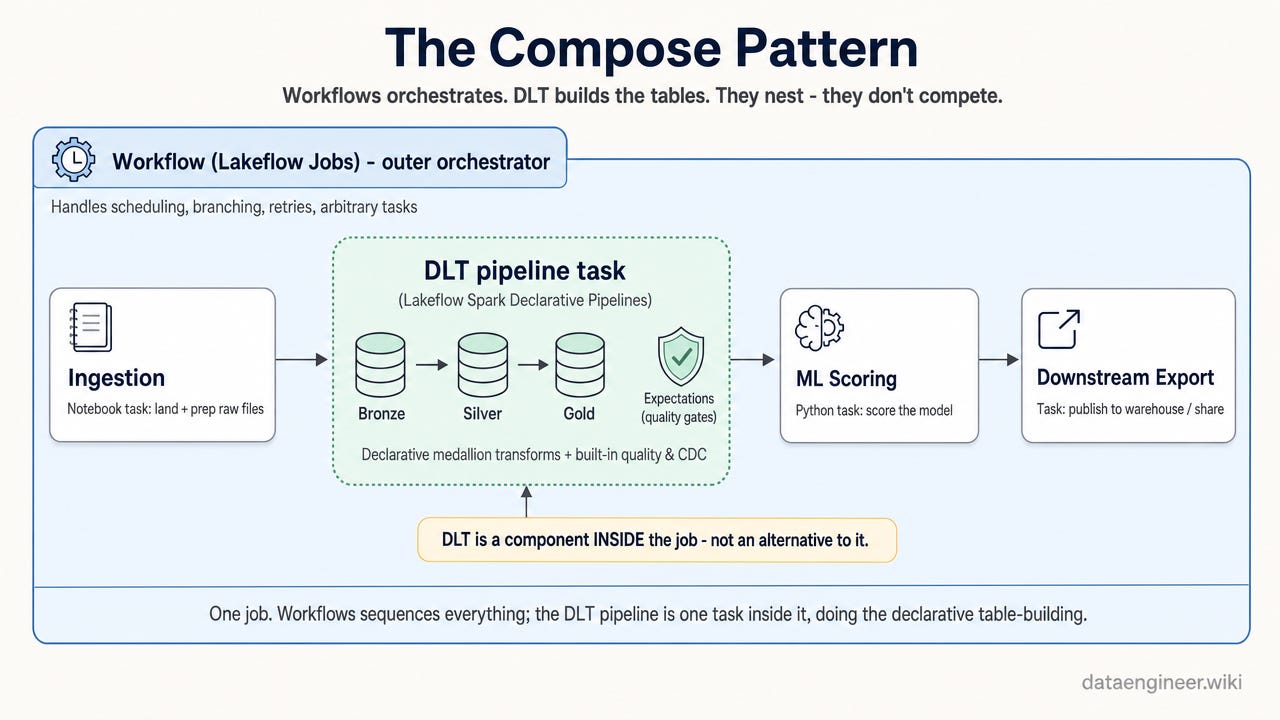
The instinct to pick a side and rebuild everything on it is the junior move. Noticing that they compose is the senior one.
The tells that give you away:
Rebuilding a working Workflow-based platform on DLT because it is “the modern way,” paying full migration cost to solve no problem.
Forcing arbitrary tasks (API calls, model training, file moves) into DLT and fighting the framework instead of orchestrating them in a job.
Hand-writing dependency graphs, checkpoints, and MERGE-based CDC in Workflows when the pipeline is pure table-building DLT would have managed.
Paying the DLT premium for a trivial nightly transformation a plain job runs for less.
Treating them as mutually exclusive and never running a DLT pipeline inside a Workflow.
Adding DLT expectations and never looking at the quality metrics. Guardrails you do not monitor are decoration.
Choosing based on what the team already knows instead of what the pipeline needs.
This is why orchestration architecture shows up in senior interviews and promotion packets. Anyone can run a notebook on a schedule. Knowing why this pipeline is declarative and that one is orchestrated, and being able to defend the call on cost and lock-in, is the difference between the engineer who executes tickets around $150k and the one trusted to design the platform in the $200k-plus band.
Next time someone says “we should just move everything to DLT,” ask them which of the four dimensions is driving it: authoring model, quality, cost, or lock-in. If they cannot name one, it is hype, not architecture. Where is your current line between the two, and has running DLT inside a Workflow changed it?
Premium Further Reading
The deep-dives a reader who just finished this DLT-versus-Workflows breakdown would naturally pick up next: how to run the compute, enforce the quality, and defend the architecture call. Old posts are auto-archived for premium subscribers only.
This article decides orchestration on four dimensions: authoring, quality, cost, and lock-in. The picks below go one layer deeper on the compute, the quality gates, the CDC feature, and the senior judgment behind each call.
The Databricks Compute Selection Guide: Jobs, All-Purpose, SQL Warehouses, and Serverless: Why scheduled jobs on All-Purpose clusters are bleeding thousands of dollars a month - and how to fix it in 15 minutes
6 Data Quality Checks I Build Into Every Databricks Pipeline: The silent failures that broke executive dashboards for 5 days
Databricks CDC Interview: The 200GB/Day Pipeline with SCD Type 2: Why custom MERGE logic is the trap, and how AUTO CDC + Liquid Clustering is the senior answer that wins FAANG offers
The Databricks Technical Debt Navigation Guide: When to Ship and When to Perfect: The pragmatic judgment framework that senior engineers use to balance velocity and quality - with 8 real scenarios, decision templates, and a 30-day practice plan
The Optimization Trap: Junior vs. Senior Data Engineers: One burns money, one builds ROI. Why your response to “make it faster” defines your career level.
Keep Practicing?
This post decides DLT vs Workflows on four dimensions and lands on the compose pattern. Here is where to actually build both, close the concept gaps, and prep the senior-interview version of that call.
Databricks Code Practice (104 exercises + 5 labs): One repo, three tracks: 104 LeetCode-style exercises, 4 end-to-end pipeline labs, and benchmark deep-dives. Runs on Databricks Free Edition.
DataDojo (633 exercises): Duolingo-style daily practice for Databricks data engineers. Seven zones, XP, streaks, and certification prep.
Databricks 100 (100 concepts): The must-know concepts for every Databricks data engineer. Self-score, find gaps, commit to the 100-day challenge.
Senior Interview Cheat Sheet: Structure your production experience into the senior-level answers that get $175K-$210K+ offers.