
How Unity Catalog Permissions Actually Work in Databricks
Why SELECT alone still returns permission denied (6 min)

Every Databricks engineer has done this. You grant SELECT on a table, tell the analyst they’re cleared, and thirty seconds later they ping you: still getting “permission denied.” You check the grant. It’s there. The query still fails.
Unity Catalog isn’t broken. It’s doing exactly what it was designed to do. And once the model underneath it clicks, you stop filing one-off access tickets and start owning how access works on your team, which is a large part of what separates a $135k-$180k mid-level engineer from someone in the $175k-$240k senior band.
Here’s the whole model, as a conversation.
The query that fails with the right grant
Data Engineer: “I granted SELECT on the table. The user still can’t read it. What am I missing?”
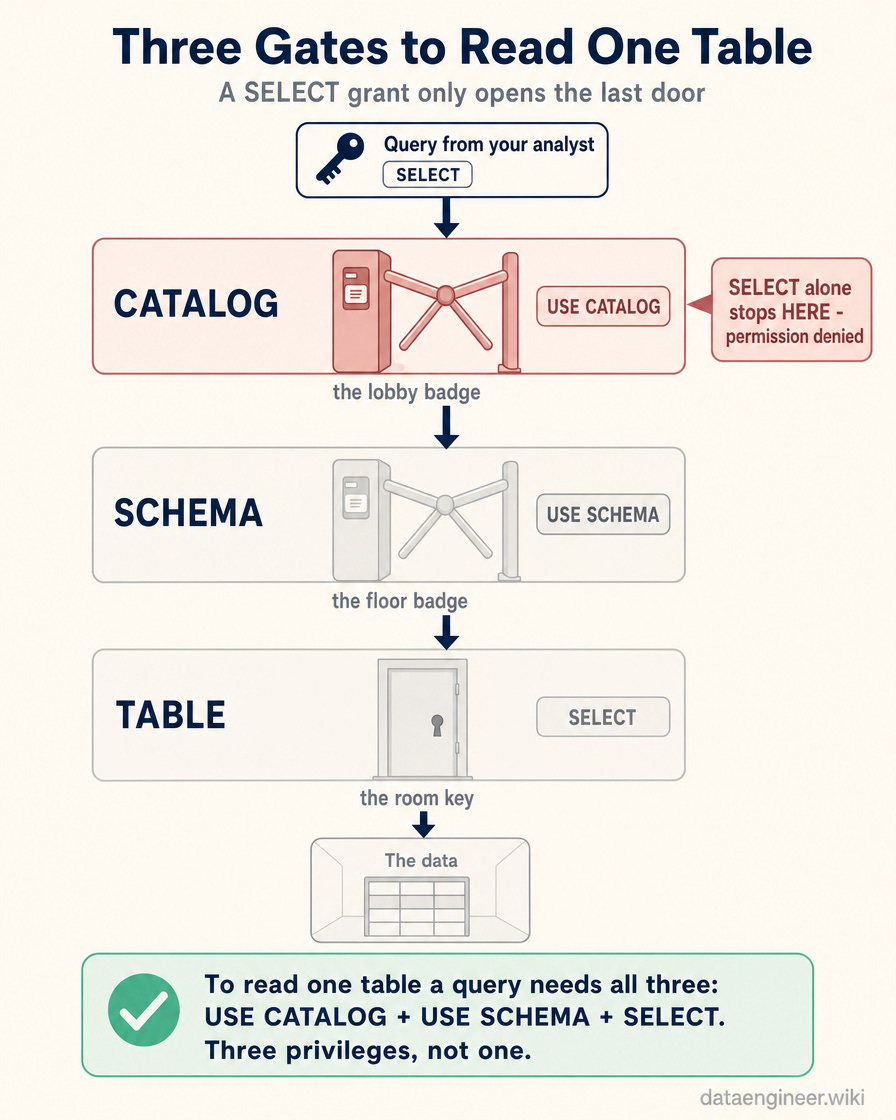
Unity Catalog: “A grant on the table isn’t enough on its own. Every object I govern lives in a three-level namespace: catalog, then schema, then table. To read one table, a user needs permission to pass through each level. USE CATALOG on the catalog, USE SCHEMA on the schema, and SELECT on the table itself. Three privileges, not one. You gave them the third and skipped the first two.”
Data Engineer: “So the SELECT is real, they just can’t reach the table it’s attached to.”
Unity Catalog: “Exactly. Think of it as a building. SELECT is the key to a specific room. USE CATALOG and USE SCHEMA are the badge swipes at the lobby and the floor. A room key gets you nothing if you can’t get out of the lobby. This one gap is the single most common access ticket I see, and it’s why ‘I gave them SELECT’ and ‘they can read the data’ are not the same sentence.”
Why you don’t grant all three every time
Data Engineer: “That sounds exhausting. Three grants for every table, for every person?”
Unity Catalog: “You don’t. Privileges inherit downward. Grant something at the catalog level and every schema and table inside it inherits that privilege, including tables that don’t exist yet. Grant SELECT on a schema and every table in it inherits that SELECT, today and next quarter, without you touching another grant.”
Data Engineer: “So I could grant USE CATALOG, USE SCHEMA, and SELECT once at the catalog and be done forever.”
Unity Catalog: “You could. And that’s exactly how the second disaster happens.”
The grant that over-exposes everything
Data Engineer: “Disaster? It’s efficient.”
Unity Catalog: “It’s efficient at exposing data you never meant to share. Inheritance doesn’t stop at the tables you’re thinking about. Grant broad read access at the catalog level and you’ve granted it on every table in that catalog. The finance schema, the tables holding customer PII, and every table anyone creates in it for the rest of its life. Six months later someone lands raw personal data in a new schema, and the analyst you unblocked in March can already read all of it. Nobody granted them that. Inheritance did.”
Data Engineer: “So the same feature that saves me from re-granting is the one that quietly over-shares.”
Unity Catalog: “Every time. Inheritance is a power tool. Pointed at the right level it’s leverage. Pointed at the top of the tree it’s a leak. The whole skill is choosing the level.”
Choosing the level - the actual decision
Data Engineer: “Then how do I choose the level?”
Unity Catalog: “Match the grant to the blast radius you actually intend. Work from the narrowest level that satisfies the real need:
Grant at the table level when one person or team needs one dataset. Highest control, most maintenance. Use it for anything sensitive - PII, financials, anything you’d have to explain in an audit.
Grant at the schema level when a team owns a coherent domain and should see everything in it, current and future. This is the default for most team access. A schema usually maps to how people actually think about their data, so it’s usually the right unit.
Grant at the catalog level only for genuinely catalog-wide roles - a platform team, a governance tool, or a broad USE CATALOG that just lets people navigate. Almost never broad SELECT here.
Never grant on sensitive data as a shortcut to unblock someone. The ad hoc catalog-level grant that fixes today’s ticket is the exposure someone finds in next year’s audit.”
Data Engineer: “So the instinct to grant high because it’s less work is the exact instinct to fight.”
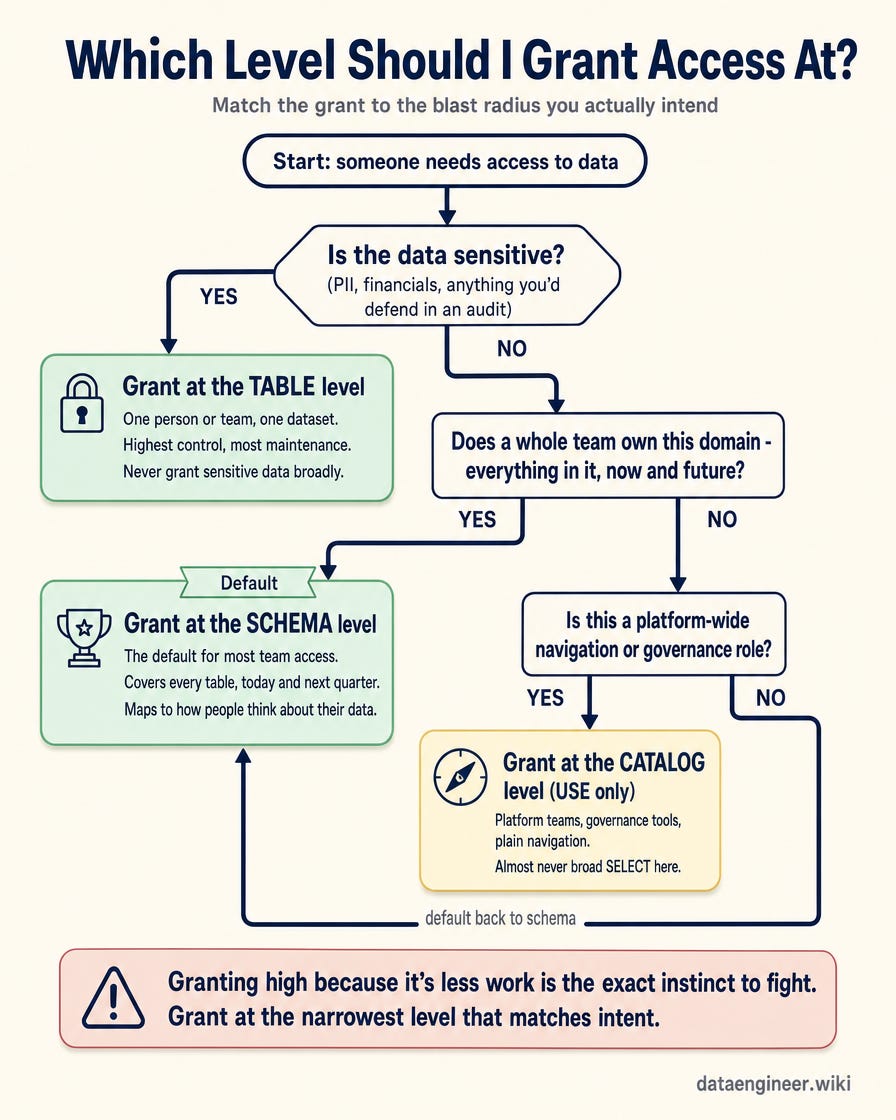
Unity Catalog: “That’s the junior-to-senior line in one sentence. The junior move is to grant wherever makes the error go away. The senior move is to grant at the smallest level that matches intent, because they’re already thinking about the table that doesn’t exist yet.”
The part that breaks six months later: people
Data Engineer: “What happens when someone leaves the team?”
Unity Catalog: “That depends on a decision you made months earlier, whether you knew it or not: did you grant to a person or to a group? Grant privileges to individuals and every departure, transfer, and new hire is a manual cleanup you’ll forget to do. Grant to groups, and manage membership at the group level, and access follows the org automatically. Someone joins the data team, they inherit the team’s access. They leave, it’s gone. You never touch a grant.”
Data Engineer: “And ownership? Every object seems to have an owner.”
Unity Catalog: “It does, and owners are their own quiet failure mode. The owner of an object has every privilege on it implicitly and can grant those privileges to others, no explicit grant needed. By default the owner is whoever created the object. So the analyst who spun up a table last year silently controls who can read it, and the day they leave, that object is orphaned. Set ownership to a group, not a person, for anything that matters. Owners outlive employees only when the owner is a team.”
How to see what someone can actually do
Data Engineer: “Say I inherit a workspace and I have no idea who can see what. Where do I even start?”
Unity Catalog: “Stop reasoning from individual grants - that’s the trap. A user’s effective access is the sum of every privilege they hold directly, every privilege their groups hold, and everything those inherit from the levels above. Read it top-down. Start at the catalog and ask three questions at each level: who has USE here, who has SELECT or MODIFY here, and who owns this. Then walk down to the schema, then the table. The permissions view in Catalog Explorer shows each object’s grants directly, so you don’t have to hold the whole tree in your head. The mistake is auditing table by table from the bottom, because you’ll miss the catalog-level grant that’s quietly feeding everyone.”
Data Engineer: “So the answer to ‘can this person see this table’ is never just the table.”
Unity Catalog: “It’s never just the table. It’s the whole path from the top of the namespace down, plus every group they’re in. Hold that model and the access questions that used to be a shrug become a thirty-second answer.”
The reframe
Data Engineer: “So if I had to keep one thing?”
Unity Catalog: “Access isn’t a switch on a table. It’s a path through a hierarchy - USE to travel, SELECT to read - where every grant inherits downward onto objects that don’t exist yet, and every object has an owner who can hand out more. Govern the path, not the switch. Grant to groups at the narrowest level that matches intent, own with teams instead of people, and read access top-down. The engineer who files an access ticket and the engineer who owns the access model are doing very different jobs. Only one of them is getting promoted for it.”
Which of these has bitten your team - the SELECT that wasn’t enough, or the catalog grant that exposed too much? Tell me in the comments, and I’ll pull the most common patterns into a follow-up on designing a group and schema layout from scratch.
Premium Further Reading
The deep-dives a reader who just governed their first access path would naturally pick up next: the interview version of this same governance model, and the senior-ownership habits it points toward. Old posts are auto-archived for premium subscribers only.
This article’s core move is owning the access model instead of filing tickets. The picks below turn that into interview answers and the senior habits promotion committees actually cite.
10 Unity Catalog Questions Every $180k Databricks Interview Asks: The answers that pass the $180k governance screen
What Senior Databricks Engineers Do That Mid-Levels Don’t: The habits promotion committees actually cite
Code Reviews at Scale: What Fortune 500 Companies Actually Do (And Why Your Quick LGTM Is Fine): The 80/20 framework that focuses your attention on schema changes, resource sizing, and failure paths - while safely speeding up the rest
How Databricks Engineers Disqualify Themselves From Promotion in 30 Seconds: What managers actually hear when you read your Jira board (3 minutes)
Keep Practicing?
You just learned to read Unity Catalog access top-down and grant at the narrowest level that matches intent. Now go drill the namespace, close the concept gaps, and rehearse the governance answers before someone asks in an interview.
DataDojo (633 exercises): Duolingo-style daily practice for Databricks data engineers. Seven zones, XP, streaks, and certification prep.
Databricks 100 (100 concepts): The must-know concepts for every Databricks data engineer. Self-score, find gaps, commit to the 100-day challenge.
All 3 Levels Bundle: Junior + Mid + Senior interview cheat sheets for any interview level - the trade-off thinking that turns governance knowledge into offer-winning answers.
Databricks Code Practice (104 exercises + 5 labs): One repo, three tracks of LeetCode-style exercises and end-to-end pipeline labs. Runs on Databricks Free Edition, so you can stand up catalogs and test grants yourself.